
How to Buy Backlinks
-
Login to your account as an advertiser.

-
Add Tatget Page you want to buy text links for, here.
-
Make sure you have enough credits to buy text links. You can buy credits here.
-
You can buy backlinks in our system, using different approaches:
- By going to My Target Pages page and then,
when selecting link page, you will have to pick an appropriate link type you want to buy.
- By going to "Buy Backlinks" menu and then selecting an appropriate submenu.
When you choose this approach the appropriate link type will be selected for you automatically, so you will not have to do it.
- By going to My Target Pages page and then,
when selecting link page, you will have to pick an appropriate link type you want to buy.
-
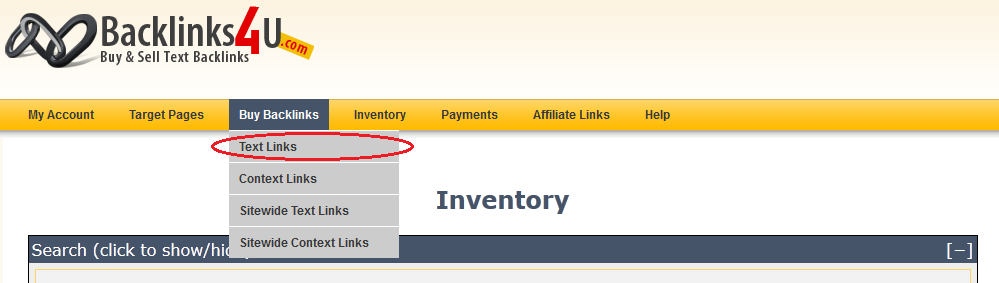
Go to "Buy Backlinks" menu and click on "Text Links" submenu there.
-
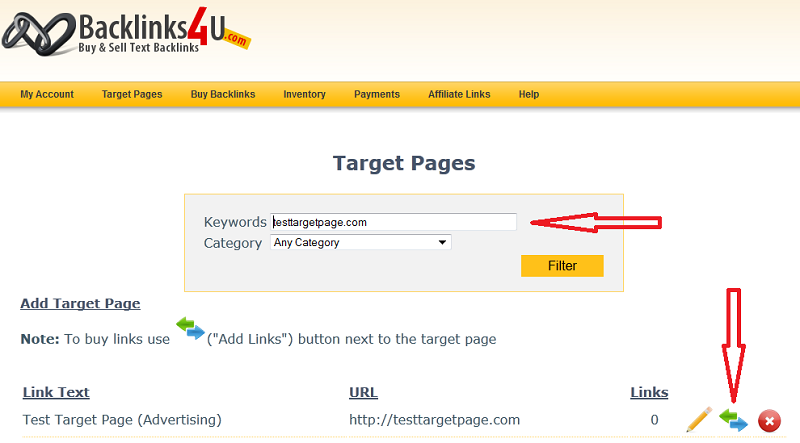
Find target page you want to buy backlinks to and click
 (Add Links) button next to it.
-
Search for link pages you want to have backlinks from.
As you can see on the screenshot below the appropriate link type ("Text Links") was already selected for you and there are no other types available in that drop down list.
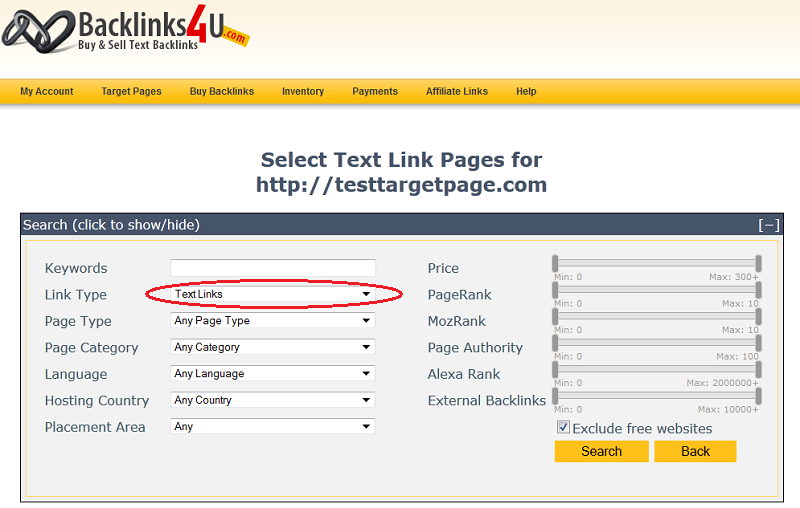
If you decided to use first approach mentioned above, you will need to select an appropriate link type yourself (in this case "Text Links").
In the form above adjust parameters to satisfy your criteria for backlinks you want to get to your page and click 'Search' button.
-
After you have found a page you want to buy text link ad from, simply click on 'Add Link' button next to it.

-
Last thing you need to do is edit link text you want to be displayed on the link page and press 'Confirm' button.
For context links you will need to enter a short text with your link embedded into it.